Apple’s new Live Rewind and Siri Recap features can recall the last 15 seconds of speech and summarize daily conversations, but early testing reveals awkward social moments, accuracy problems and questions about privacy.
Apple is bringing artificial intelligence deeper into everyday conversations with two new Apple Watch features that can help users remember what someone just said or revisit important discussions later.
The features, called Live Rewind and Siri Recap, are part of Apple’s Audio Intelligence technology for the Apple Watch Series 12 and Apple Watch Ultra 4. They use artificial intelligence to process spoken conversations and present information through short text snippets or automatically generated summaries.
However, while the technology promises to make missed information easier to recover, early testing suggests it may introduce a new problem: using artificial intelligence during ordinary conversations can feel socially uncomfortable.
A November 17 report by WIRED highlighted this tension, describing situations in which activating Live Rewind seemed less natural than simply asking another person to repeat what they had said. WIRED+1
What Is Apple Watch Live Rewind?
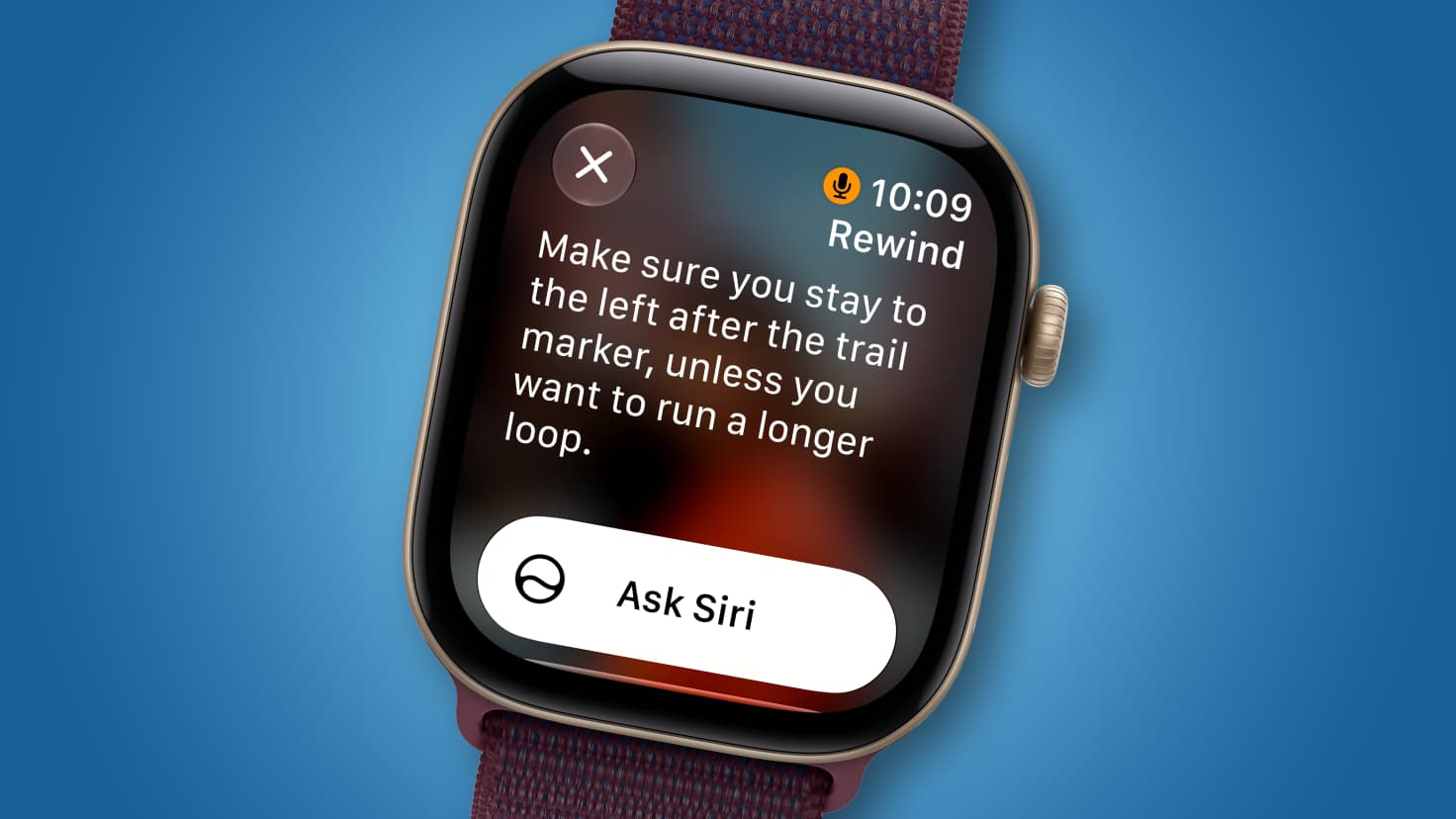
Live Rewind is an AI-powered feature that allows compatible Apple Watches to display a text transcription of speech from the previous 15 seconds.
Instead of asking someone to repeat a sentence, users can double-press the Digital Crown on their Apple Watch to see a short text snippet showing what was recently said.
The technology is designed for situations where someone misses important information during a conversation, meeting, announcement or presentation.
For example, a person listening to instructions could use Live Rewind to recover the last few words without interrupting the speaker.
Unlike a conventional voice recorder, however, Live Rewind does not provide a replayable audio file or a complete conversation history.
Apple says audio is processed in protected hardware, and users receive only the relevant text snippet.
Siri Recap Can Summarize Conversations Throughout the Day
Alongside Live Rewind, Apple has introduced Siri Recap, a feature that takes a broader approach to remembering conversations.
Siri Recap can generate high-level summaries of conversations detected throughout the day when the user has enabled the feature.
These summaries are accessible through the Siri app and can help users recall important topics or information discussed earlier.
Unlike Live Rewind, which focuses on the previous 15 seconds, Siri Recap is intended to provide a general record of important conversational points rather than a word-for-word transcript.
Users can activate it manually or configure schedules based on time and location.
For instance, someone could enable Siri Recap during working hours but disable it at home.
Apple also allows users to edit, save, export or delete their summaries. Unsaved recaps can be configured to disappear automatically after a period of up to seven days.
Why Using Live Rewind Can Feel Awkward
The convenience of Live Rewind creates an unusual social situation.
People typically respond to missed speech by asking the speaker to repeat themselves. Using an Apple Watch to recover the same information introduces another device into what would otherwise be a straightforward human interaction.
In WIRED’s November 17 hands-on report, technology journalist Julian Chokkattu described testing Live Rewind during conversations with family members.
Although the technology successfully recovered missed speech in some situations, the interactions themselves could become uncomfortable or distracting.
This raises a broader question about the future of wearable AI: does every problem that technology can solve actually need a technological solution?
In a quiet meeting or lecture, Live Rewind could be valuable. During a personal conversation, however, activating a smartwatch to check another person’s words may appear unnecessary.
The feature could also cause misunderstandings if someone incorrectly assumes their entire conversation is being permanently recorded.
Privacy Concerns Surround Apple’s Conversation Technology
The introduction of AI-powered conversation summaries raises important questions about personal privacy.
One concern is that the person wearing the Apple Watch controls the feature, while other people participating in a conversation may not have explicitly agreed to have their words processed.
Apple has introduced several protections intended to reduce these concerns.
The company says its Audio Intelligence system does not produce or retain accessible audio recordings. Instead, audio is processed in protected hardware using technology built into Apple’s S11 chip.
For Live Rewind, speech recognition takes place on the Apple Watch and paired iPhone.
When the feature is activated, the watch plays an audible chime and displays visual indicators intended to alert nearby people.
Siri Recap uses Apple’s Private Cloud Compute infrastructure to generate summaries from condensed conversation text.
Apple says the underlying audio is not stored on its servers and that saved summaries are protected through end-to-end encryption when synchronized with iCloud.
Nevertheless, these technical protections do not completely resolve the social question of whether everyone involved in a conversation is comfortable with AI processing their speech. Apple Support+1
Early Testing Reveals Accuracy Limitations
Another challenge is reliability.
In WIRED’s hands-on testing, Live Rewind performed better in relatively quiet environments but became less dependable when background noise increased.
The feature can misinterpret words or return inaccurate text, particularly when several people are speaking simultaneously.
Its 15-second limit also means users can miss the beginning of important statements.
Siri Recap presents a different challenge because automatically generated summaries do not necessarily preserve the full meaning or context of a discussion.
Apple acknowledges that its AI-generated transcripts and summaries can contain errors or omit information.
Consequently, the technology should not be treated as an authoritative record of important conversations, agreements or instructions.
Which Apple Watch Models Support Live Rewind?
Apple’s new conversation features are limited to its latest supported smartwatches and compatible iPhones.
| Requirement | Compatibility |
|---|---|
| Apple Watch models | Series 12 and Ultra 4 |
| Processor | Apple S11 |
| Watch software | watchOS 27.3 beta |
| Paired iPhone | Supported iPhone 16 or newer |
| iPhone features | Apple Intelligence and Siri AI beta |
| Initial language | English |
| Availability | Beta, with regional restrictions |
| Minimum age | 18 years |
Apple’s support documentation confirms that Live Rewind and Siri Recap are not available to users under 18. The features are also unavailable in China and are not initially offered in the European Union.
As of November 17, 2026, the features are being tested through watchOS 27.3 beta, with broader availability expected later.
How to Enable Live Rewind on a Compatible Apple Watch
For eligible users with supported hardware and software, Apple provides a straightforward activation process.
- Open the Watch app on the paired iPhone.
- Select Siri.
- Tap Live Rewind.
- Enable Double Click Digital Crown.
- When the feature is enabled, double-press the Digital Crown to display the previous 15 seconds of speech.
Siri Recap can also be configured through the Siri section of the Watch app, with options to control when the feature operates.
Not every compatible device will necessarily have access during the beta period.
Could AI Conversation Summaries Become Standard on Smartwatches?
Apple’s Audio Intelligence technology reflects a wider movement toward AI assistants that can understand users’ surroundings instead of relying exclusively on typed commands.
Smartphones, smart glasses and wearable devices are increasingly being developed to recognize speech, identify contextual information and help users remember everyday activities.
The potential benefits extend beyond convenience.
People attending lectures, managing busy schedules or participating in lengthy discussions could find automated summaries helpful.
However, widespread adoption will depend on more than transcription accuracy.
Manufacturers will also need to address battery performance, transparency, data security, consent and the social expectations surrounding devices that process conversations.
Apple Watch Live Rewind and Siri Recap represent an interesting step toward a future in which personal technology can help users remember everyday discussions.
Live Rewind offers a convenient way to recover recently missed speech, while Siri Recap provides AI-generated summaries of earlier conversations.
But the technology also introduces difficult questions about privacy, accuracy and the role of artificial intelligence in personal communication.
For now, Apple’s latest innovation demonstrates both the promise and the awkwardness of bringing AI into ordinary human conversations.
The biggest challenge may not be teaching smartwatches to understand what people say. It may be determining when they should listen at all.